Klarschliff
GPU monitoring for NVIDIA cards

Klarschliff GPU-Wächter

Plenty of tools show temperature, watts and clocks. GPU-Wächter also shows how the current is spread across the individual pins of the power connector – the spot where expensive cards melt.

€19one-time · VAT included
Buy Download demo

English and German interface · Windows 10/11 · runs offline · Deutsche Seite →

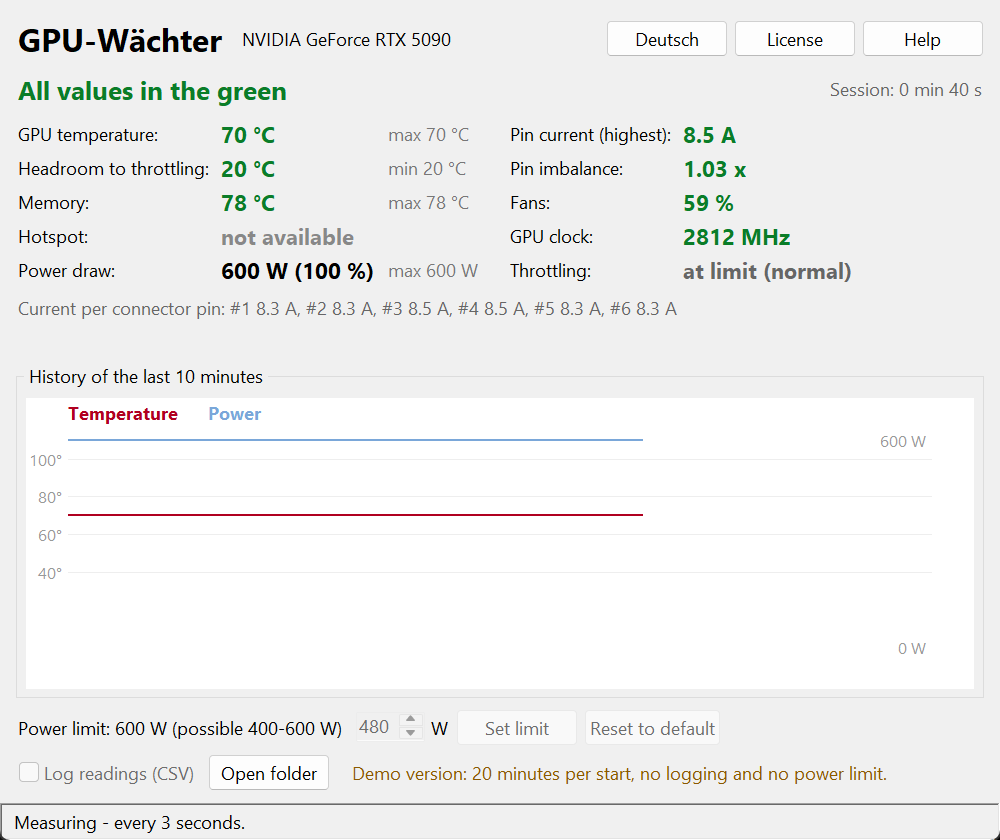
Klarschliff GPU-Wächter in English: readings with status light, peak values, per-pin current and history chart, measured on an RTX 5090 at full load.
Real readings from an RTX 5090 at 600 W: six connector pins between 8.3 and 8.5 A, imbalance 1.03× – a healthy connector.
Why it matters

The connector is the weak spot.

A 600-watt card pulls about 50 amps through six thin contacts. If the plug sits slightly crooked or a contact is worn, a single pin suddenly carries twice the load – and the GPU temperature won't tell you.

Current per pin

GPU-Wächter shows every pin and calculates the imbalance: highest current divided by lowest. At 1.6× it turns red – long before you smell anything.

Memory temperature

The NVIDIA driver doesn't report it. With the free HWiNFO running in the background, GPU-Wächter reads it for you – plus whatever else your card reports.

Headroom to throttling

Instead of a bare temperature: how many degrees your card has left before it slows itself down. When that number shrinks, dust or case airflow is usually to blame.

History and logging

A ten-minute chart on screen and optional CSV logging. After gaming you can see exactly where the peaks were.

Lower the power limit

One button sets the card's power limit, say to 80 percent. That typically costs only a few percent of frame rate but brings noticeably less heat and noise.

Never acts on its own

GPU-Wächter measures and warns. Nothing on your card changes unless you click it – and Windows asks for confirmation on top.

To be honest

What it can't do.

So you know what to expect.

Specs

The essentials.

Frequently asked questions

Which cards report the current per pin?

That's decided by the card's manufacturer, not the software. Several current ASUS models measure each pin; other cards only report the total. GPU-Wächter shows what your card provides – if a value is missing, it honestly says "not available".

Why do I need HWiNFO?

The NVIDIA driver doesn't expose memory temperature or pin currents. HWiNFO reads them straight from the card and shares them with other programs. It's free, and the program explains the setup step by step.

How do I get my license key?

Right after payment you receive an email with your personal key. Click "License" in the program and paste it – the full version unlocks immediately and your settings stay as they are.

Is the license agreement in English?

The license agreement is in German, as the product is sold from Germany under German law. Checkout, invoicing and VAT are handled by Polar as merchant of record.

Measure instead of hoping.

The demo shows every reading – 20 minutes per start, no account needed.